Fancy Text Generator – Copy & Paste Stylish Text
Ready to copy stylish text.
Fancy Text Generator → Create Stylish Text & Nicknames
Type a name, bio line, or short message above, then browse Unicode styles you can copy into a caption, username, or chat. Nothing is installed on your device. The letters you copy are still text, so compatible apps can display them without a font download.
How to Use Fancy Text Generator X
Step 1
Enter Your Text
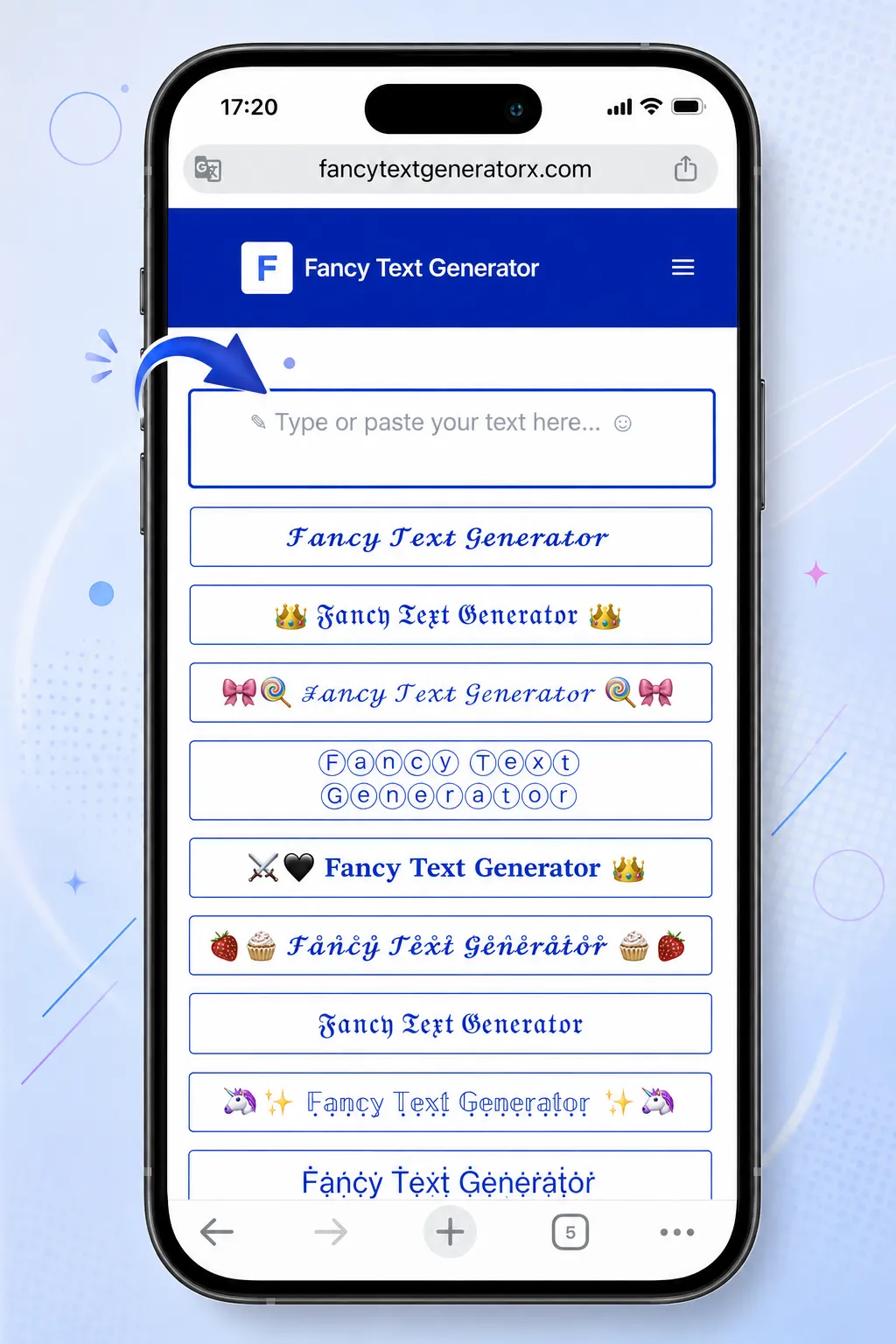
Type a name, nickname, bio line, caption, or short message in the box at the top of the page. Fancy Text Generator X updates the list as you type, so you can try a word, a phrase, or a username without leaving the generator. Spaces and punctuation stay in place.
Step 2
Browse Fancy Text Styles
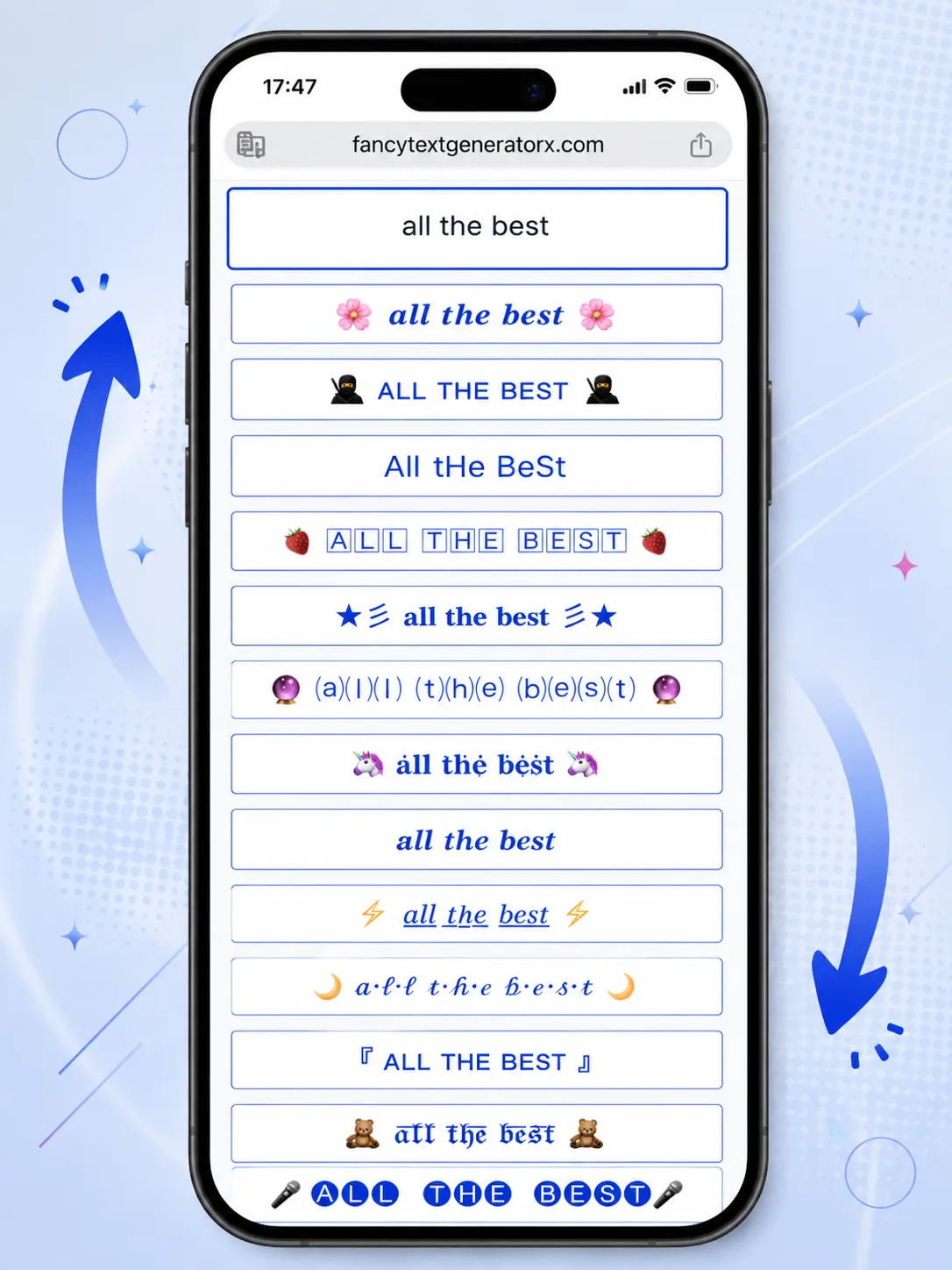
Scroll the result list to compare cursive, bold, bubble, gothic, symbol, cute, and emoji-decorated styles. Each row is a different Unicode look for the same input. Use Load More when you want to keep exploring the catalog.
Step 3
Copy Your Favorite Style
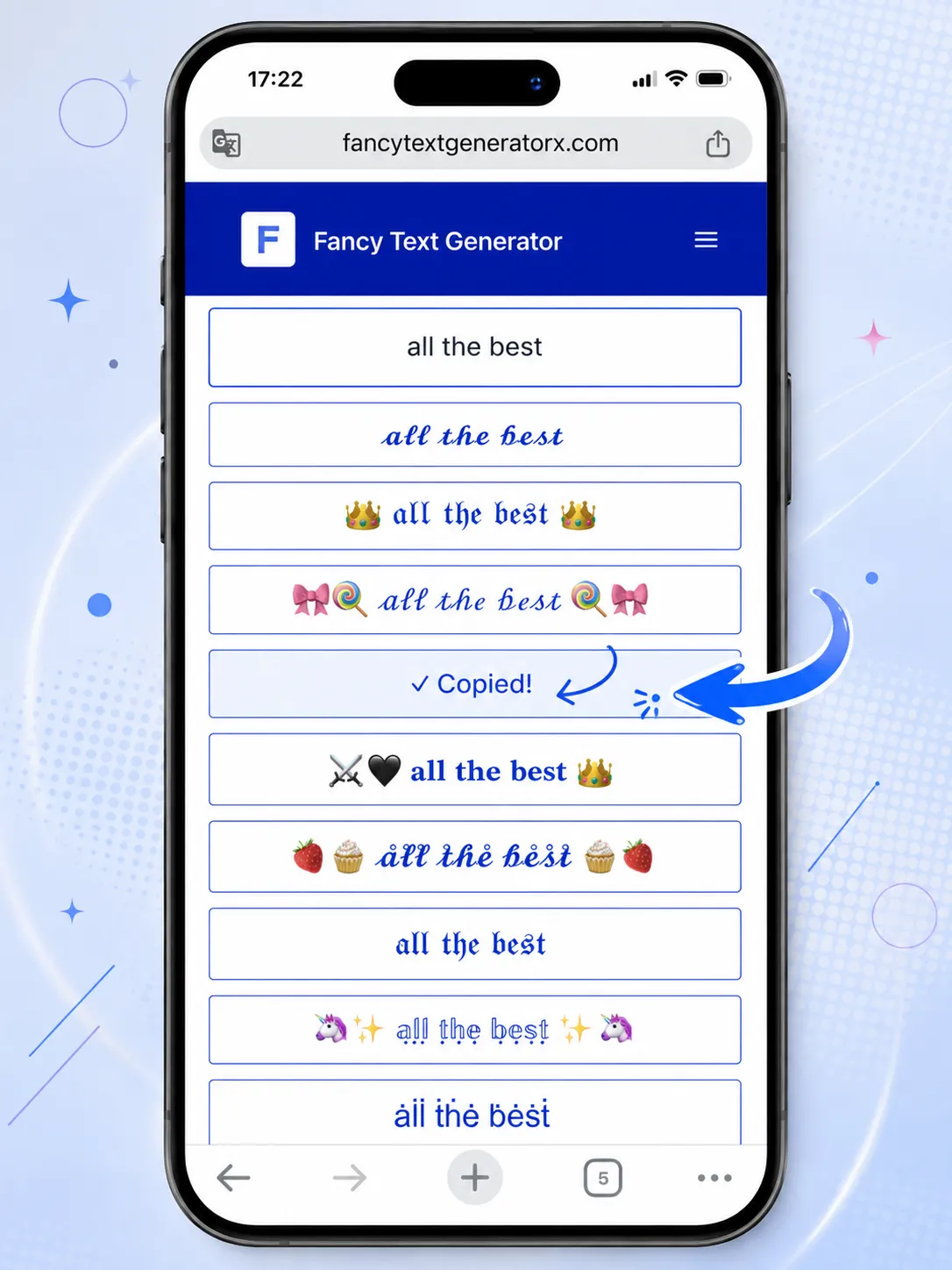
Click a result row to copy it. The row briefly shows Copied! when the clipboard update succeeds. You do not need a separate download or a font installer — the stylish letters are already text, ready to paste.
Step 4
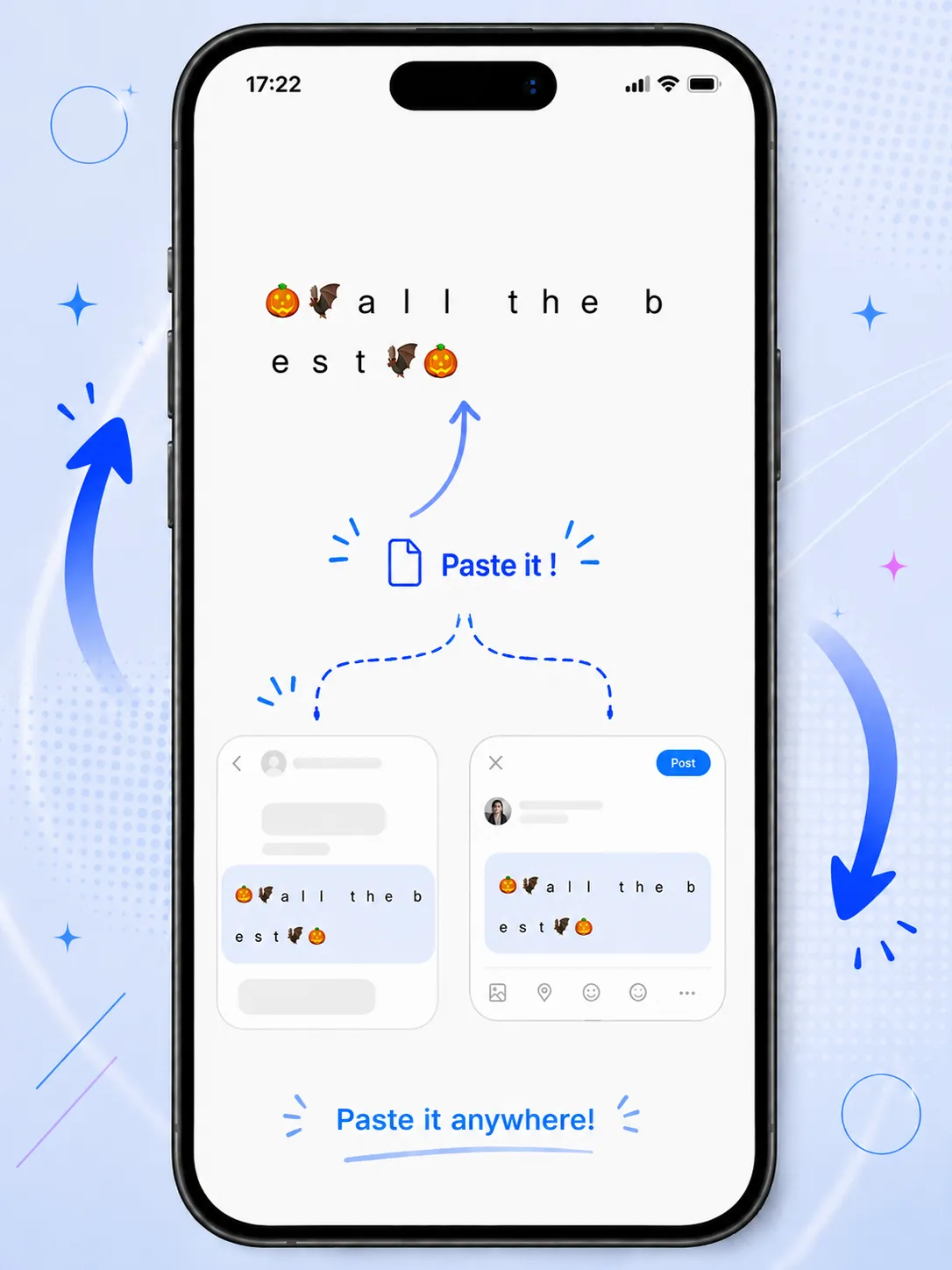
Paste It Anywhere
Paste the copied characters into a bio, comment, chat, video description, or document. Compatible apps show the fancy letters because they are Unicode, not a custom font file. If a device is missing a glyph, try a more common style.
Explore 500+ Fancy Text Styles
This page offers 500+ style variations built from Unicode characters and symbols. The catalog currently includes 900 unique looks: some only change the alphabet, while others add frames, emoji, or light decoration around the same words. You preview them in the list above as soon as you type.
You can compare cursive, bold, italic, bubble, gothic, cute, symbol, weird, decorative, emoji-decorated, upside-down, small, and aesthetic text without installing anything. Scroll the rows, copy the version that fits a bio, username, caption, or nickname, and paste it into a compatible app. If a letter has no match in a style, the original character stays so the message does not disappear.
Stylish
𝐅𝐚𝐧𝐜𝐲
Cursive
ℱ𝒶𝓃𝒸𝓎
Gothic
𝔉𝔞𝔫𝔠𝔶
Bubble
Ⓕⓐⓝⓒⓨ
Wide
Fancy
Cute
♡ ℱ𝒶𝓃𝒸𝓎 ♡
Popular Fancy Text Styles
The list above is one generator with many looks, not a set of separate tools. Use these notes to pick a direction, then copy the row that matches the space you have.
Cursive Text
Cursive and script letters look closer to handwriting than to a standard keyboard font. They work well for names, short bios, and invitations where you want a softer look. Keep captions brief; long script paragraphs are harder to scan on a phone.
Bold Text
Unicode bold is useful when an app has no built-in bold button. It can highlight a name, a heading, or one key phrase in a post. It usually displays more reliably than rare symbols, which makes it a practical first choice.
Bubble Text
Bubble and circled letters feel playful and compact. People often use them for nicknames, stickers-style bios, and short comments. They stand out quickly, but they can look crowded if you convert a full sentence.
Gothic and Old English Text
Gothic, Fraktur, and Old English-style letters feel heavier and more formal. They suit logos, team names, and dramatic titles. Test them before publishing, because some devices substitute missing glyphs or fall back to boxes.
Cute and Aesthetic Text
Cute and aesthetic looks often mix softer letter shapes with hearts, stars, or light frames. They are common in Instagram-style bios and profile names. A little decoration is usually enough; extra symbols can hide the words.
Symbol and Emoji Text
Some rows wrap your words with symbols or emoji instead of only restyling the alphabet. That can mark a gaming name, a seasonal bio, or a channel label. Leave space around the letters so the name stays readable.
Weird and Glitch Text
Weird, zalgo-like, and glitch styles stack marks or distort the baseline for a noisy effect. They are better as accents than as a whole bio. If a platform strips combining marks, the result may look plainer after paste.
Small Text and Upside Down Text
Small text and upside-down letters are novelty styles for comments, jokes, and compact labels. They are fun in short bursts. Avoid them for important information, because they are slower to read and may confuse screen readers.
Fancy Text for Social Media
Social feeds move quickly. A bio, username, caption, comment, or short profile line has only a moment to be noticed. Stylish Unicode text can help those few words look more distinctive than plain keyboard letters, especially in a list of similar profiles.
It will not magically grow an audience. What it can do is give a name or caption a clearer visual shape. Keep the message readable, then paste and check it in the app, because each platform handles special characters a little differently. A short, well-chosen line usually works better than converting an entire paragraph. The same generator powers the platform pages linked below.
Fancy Text for Instagram
On Instagram, people often style a bio, a display name, captions, comments, and highlight titles. Cursive or aesthetic letters can suit a personal profile; bold or simple bubble text is easier to read in a caption. Keep the core words clear so the profile still makes sense at a glance. After you copy a row, open Instagram Fonts if you want a page focused on that use, then paste and preview in the Instagram app before you publish.
Fancy Text for TikTok
TikTok bios, captions, comments, and some display names can show Unicode letters. Short creator names and one-line bios usually look cleaner than a fully decorated paragraph. A consistent style across a username and bio can help a channel feel more intentional without changing how the videos themselves look. Preview on a phone, where most people will see it. The TikTok Fonts page uses the same generator with that platform in mind.
Fancy Text for Facebook
Facebook posts, comments, about text, and some page or group fields accept pasted characters. Bold or italic Unicode can emphasize a heading in a post. Heavier gothic or emoji frames may look uneven on older devices, so a short accent line is often enough. Page and group admins should still keep important details in plain letters. Generate a line here, or use Facebook Fonts, then paste a draft to yourself before sharing it widely.
Fancy Text for YouTube
Channel descriptions, comments, and some titles can include stylish letters. Video titles need extra care: unusual characters may be shortened, ignored, or harder to search. Common bold or italic forms are safer than rare symbols, especially if viewers will type the title later. Channel about text can take a little more decoration than a title. Browse YouTube Fonts if you want that context, then check the result on both mobile and desktop.
Fancy Text for X / Twitter
Bios, display names where allowed, posts, and replies can carry Unicode text. Short names and one accent phrase tend to hold up better than a fully converted tweet, which can be hard to scan in a timeline. Browse X Fonts if you want that context, then paste and confirm the characters still read clearly on both web and mobile before you pin a bio.
Fancy Text for Gaming Names and Usernames
A distinctive username, nickname, clan name, or team tag can make a profile easier to recognize in a crowded lobby. Unicode letters and light symbols are a common way to do that without designing a logo. Short names usually look cleaner than a long sentence wrapped in frames.
Games such as PUBG and Free Fire are often mentioned for stylish names, but support is not universal. One title may accept bold or circled letters and reject combining marks, emoji, or rare gothic characters. Another may strip special characters when you save the name, or show boxes for other players.
Copy a candidate from this page, then paste it inside the game and confirm it on the device you actually play on. If the name is rejected or unreadable, try a simpler style and keep a plain-letter version as a backup.
Where Can You Use Fancy Text?
Copied results are Unicode characters, so they can travel into many apps. How they look still depends on the fonts and rules of each device.
Social Media
Use stylish letters in bios, captions, comments, and profile names. A short line is usually enough to stand out in a crowded feed. Check the paste in the app, because each network draws Unicode a little differently.
Gaming
Try distinctive characters for usernames, clan names, team tags, and profile text where the game allows Unicode. Titles such as PUBG or Free Fire may block some symbols, so test the copied name in-game before you keep it.
Chat & Messaging
Paste a playful word into a chat, status, or group thread when you want more emphasis than plain type. Keep it to a phrase so the conversation stays easy to follow, and skip glitch styles in serious threads.
Usernames & Nicknames
Turn a short name into cursive, bubble, or bold letters for a display name or nickname. Leave a readable core so friends can still search for you if the app allows mixed characters in that field.
Art & Design
Drop decorative letters into a mood board, mockup, or headline concept when you need a look quickly. This is copy-and-paste text art, not a substitute for a licensed display font in print or brand work.
Documents & Notes
Add a styled heading in personal notes or informal drafts if the editor renders Unicode. Avoid it for official documents, shared reports, or anything colleagues need to search and copy as plain letters.
Email Signatures
A small accent in a name or title can add character. Keep the rest of the signature in normal letters so names, phone numbers, and links stay readable in every inbox and on every device.
Education
Teachers and students sometimes use styled headings in slides, class projects, presentations, or study notes. Choose simpler styles when the goal is to teach, and keep body copy in a regular alphabet.
Creative Writing
Use a distinctive title or character name in a draft, zine, or informal story post. Save the fanciest rows for titles and bylines; body text is clearer, and easier to edit, in a regular alphabet.
How Does Fancy Text Generator X Work?
Fancy Text Generator X does not install a new font on your device. It transforms ordinary letters into visually different Unicode characters and, in some styles, combines them with symbols or emoji. The same word can appear as mathematical bold, script, double-struck, circled, or another Unicode representation.
That is why you can copy a result and paste it elsewhere without downloading a font file or installing software. Many platforms display the characters directly because they are still text, not an image and not a custom typeface package. Your original keyboard letters remain available if you need a plain backup.
There are limits. Not every Unicode character is available on every app or device. Some platforms restrict special characters in names or titles. Highly decorative styles can also reduce readability and may be harder for assistive technology. If a paste looks wrong, choose a more common look such as bold or italic Unicode.
Where Does Fancy Text Work?
Most modern Windows, macOS, iPhone, and Android devices can show a wide range of Unicode characters in desktop and mobile browsers. After you copy a style, you can often paste it into social apps, messaging apps, and other sites that accept text input.
Rendering still varies. An operating system, browser, or app may include one glyph and omit another. A style that looks complete on a recent iPhone might fall back to boxes on an older Android font set, or a game may block the same characters a chat app allows.
There is no 100% universal compatibility. Preview the pasted text on the device and platform you care about, especially before you change a username or publish a bio.
Copy and Paste Fancy Text
Enter normal text in the box above. Browse the generated styles, then click or tap a result. The styled Unicode text is copied to your clipboard. Paste it into another compatible app or website with your usual paste command — on a phone, that is often a long press, and on a computer it is the standard paste shortcut.
You do not download a font, and nothing needs to be installed for the letters to travel with you. If paste is blocked or the characters look plain, the destination may be stripping Unicode — try a simpler row or a different field.
Is Fancy Text Generator X Free and Safe to Use?
The generator is free to use in your browser. You do not need an account to type text, preview styles, or copy a result. The conversion from ordinary letters into Unicode styles happens on your device as you type.
That local processing is separate from standard website analytics, which may record traffic and product events such as page views. Generator styling does not require uploading your typed text to create the list of results. Use the same caution you would on any public website, and avoid pasting passwords or private data into the input box. Analytics helps us understand how the site is used; it is not what creates the styled letters.
Frequently Asked Questions
What is a fancy text generator?
It converts ordinary letters into stylish Unicode characters you can copy. The result is still text, not an installed font file, so you can paste it into bios, captions, nicknames, and messages in apps that accept those characters.
Is Fancy Text Generator X free?
Yes. You can generate and copy styles on this page without creating an account or unlocking a paid pack. The generator runs in your browser as you type.
Do I need to download a font?
No. Nothing is installed on your device. The tool maps your letters to Unicode lookalikes, then you copy the output and paste it somewhere else. There is no font file to save.
Is fancy text actually a font?
Not in the usual sense. A font file changes how regular letters are drawn. Fancy text uses different Unicode characters that already look decorative. Apps show them only if they include those glyphs.
How do I copy and paste fancy text?
Type in the box, browse the list, then click or tap a result row. When it says Copied!, paste into another app with your normal paste command. No download is required.
Why does fancy text work on social media?
Many social apps accept Unicode in bios, captions, and comments. They display whatever character you pasted, using the fonts on the phone or computer. Support still varies by app version and device.
Can I use fancy text on Instagram?
Often yes, in bios, captions, comments, and some profile names. Preview after pasting, because rare symbols may show as boxes on some phones. Keep important words readable.
Can I use fancy text on TikTok?
Many bios, captions, comments, and some display names can show Unicode letters. Short names usually hold up better than a fully decorated paragraph. Check the result on a phone.
Can I use fancy text on Facebook?
Posts, comments, and some profile fields often accept pasted characters. Test a draft first if you use gothic letters or heavy ornament styles, especially on older devices.
Can I use fancy text on YouTube?
You can try it in descriptions, comments, and some titles. Unusual characters in titles may be harder to search or may not render for every viewer, so simpler styles are safer there.
Can I use fancy text for gaming usernames?
Sometimes. Games such as PUBG or Free Fire may allow some Unicode names and block others. Always paste the result in the game itself before you settle on it.
Why do some fancy characters appear as boxes?
The device or app is missing that glyph in its fonts. Copying still worked. Switch to a more common style such as bold, italic, or circled letters and paste again.
Does fancy text work on iPhone and Android?
Modern iPhone and Android browsers can generate and copy these characters. How they look later depends on the receiving app and the fonts installed on that phone.
Can fancy text affect readability?
Yes. Dense gothic, glitch, or emoji-wrapped lines are slower to read and can be harder for screen readers. Use simpler styles for anything people need to understand quickly.
Create Fancy Text with Fancy Text Generator X
When you are ready, return to the box at the top of the page. Type a word or phrase, scan the styles, copy one row, and paste it wherever the destination accepts Unicode. If a platform shows boxes or strips characters, pick a simpler look and try again. The loop is the same on a phone or a computer: type, browse, copy, and use it where it displays cleanly. A short name, bio line, or caption is a good first test, and you can always come back to try another style.
Create Fancy Text